Best Large Print Keyboards for Seniors and Low Vision
Compare the best large print keyboards with oversized high-contrast letters, backlit keys and wireless options for seniors and low vision computer users.
Compare the best large print keyboards with oversized high-contrast letters, backlit keys and wireless options for seniors and low vision computer users.
As an Amazon Associate I earn from qualifying purchases. This post may contain affiliate links at no extra cost to you.
Standard keyboard lettering is small, low contrast, and quick to wear smooth, which makes everyday typing a guessing game for anyone with low vision or aging eyes. A large print keyboard fixes that with oversized, bold legends that fill each keycap, often paired with high-contrast color schemes or backlighting. The five models below cover wired, wireless, and Mac setups, so there is an option for nearly every desk.
As an Amazon Associate, we earn from qualifying purchases.
Quick Answer
For most people, the Azio KB506 Vision is the best large print keyboard: it pairs oversized legends with five backlight colors on a wired USB connection. The BOOGIIO keyboard is the budget pick, with yellow keys and black letters that stay readable in bright rooms. Mac owners should look at the Azio KB540, and anyone who wants a cord-free desk should choose the FONICER wireless keyboard and mouse set.
The KB506 is the most complete all-rounder in this group. Its key legends are printed far larger than standard, and the backlight shines through in five interchangeable colors, so you can pick the shade that contrasts best with the keycaps in your lighting. Because it is wired, there are no batteries to manage and no pairing steps; plug it into a USB port and it works.
This is the right pick for a shared family computer or a home office desk where the keyboard stays in one place. The wired connection also suits anyone who does not want to troubleshoot wireless dropouts. Setup takes under a minute, and the keyboard works with both Windows and Mac computers for everyday typing, even though the shortcut keys follow the Windows layout.
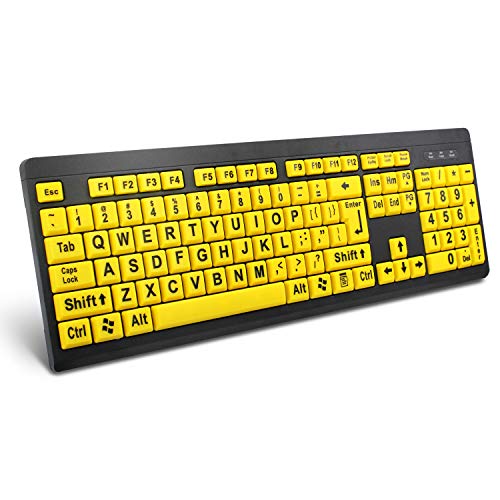
The BOOGIIO takes the opposite approach to visibility: instead of light, it relies on color. The keycaps are bright yellow with large black letters, a combination that remains legible in ordinary room light without any power draw from a backlight. It is a straightforward wired USB board with a familiar full-size layout, so there is nothing new to learn.
Choose the BOOGIIO if the computer sits in a well-lit room and the main problem is simply that standard gray-on-black lettering is hard to read. It is also a sensible spare keyboard for a guest room or a second computer. Because there is no backlight to drain or fail, it is the lowest-maintenance option in this roundup, and the bold color scheme is easy to spot on a cluttered desk.
FONICER Large Print Wireless Keyboard and Mouse
The FONICER set removes the cable entirely. The full-size keyboard and the matching mouse share a single small USB receiver, which stores beside the keyboard battery compartment when not in use. The letters are printed much larger than typical, in a high-contrast scheme, and the wireless range is stated at up to 10 meters, which comfortably covers a desk or a living-room setup.
Specs
Connection: 2.4 GHz wireless, shared USB receiver
Included: Keyboard and mouse
Backlight: None
Range: Up to 10 meters
Tier: mid-range
This set suits a tidy desk, a computer connected to a television, or anyone who finds cables a tripping or tangling nuisance. Keep spare batteries on hand, since a wireless board gives little warning before it runs flat.
The KB505U is the long-running original of the Azio Vision line. It offers a tri-color backlight in red, blue, or purple, switched with a dedicated key, plus a row of quick-access hotkeys for email, media playback, volume, and the calculator. The membrane switches are rated for ten million cycles, and the five-foot cable gives some freedom in desk placement.
Pick the KB505U if you like the idea of backlighting but only need a few color choices, or if the hotkeys appeal for one-press access to common programs. It is a proven design that has been sold for years.
Most large print keyboards are laid out for Windows, which leaves Mac users with mismatched command keys. The KB540 solves that with a proper Mac layout and a USB-C connection that matches modern Apple laptops and desktops. It keeps the Vision formula of oversized legends and adds a backlight with three interchangeable colors: blue, red, and purple.
Choose the KB540 if the computer is a Mac and you want the modifier keys to match what the screen menus show. Windows users are better served by the KB506 above, which costs less effort to set up on a PC.
How to Choose
Begin with contrast, because that is what makes the keys readable. In bright rooms, a high-contrast color scheme such as yellow keys with black letters works well and never needs power. In dim rooms, a backlit board is easier on the eyes, and a choice of backlight colors lets you avoid the shade that glares most for you.
Also consider how the print is applied. On inexpensive boards the legends are surface printed and can fade after years of heavy use, while better boards use more durable printing that holds up to daily typing. If you type for hours every day, that durability is worth paying attention to, because a large print keyboard only helps while the letters stay bold.
Next, decide between wired and wireless. Wired keyboards are simpler: no batteries, no pairing, and no signal issues, at the cost of a cable across the desk. Wireless sets keep the desk clear and work from a sofa, but they need battery changes and the small receiver is easy to misplace.
Then check the layout against your habits. A full-size board with a numeric keypad suits anyone who enters numbers often, and a standard key arrangement means no relearning. Mac users should confirm the board has a Mac layout, and everyone should confirm the connector type, since newer laptops may only offer USB-C ports.
Finally, think about key feel and extras. Most large print keyboards use quiet membrane switches, which are easy to press. Hotkeys for volume, email, and media are genuinely useful shortcuts for anyone who finds mouse navigation tiring.
Who Should Skip
Skip a large print keyboard if your vision is fine and you type by touch; the oversized legends add nothing for you, and a standard ergonomic board would serve better. Also skip these models if you need a compact keyboard for a small tray or travel bag, since every pick here is full-size. If your main difficulty is hand pain or limited finger movement rather than reading the keys, look instead at a keyboard with enlarged one-inch keys or an ergonomic split design. And if the computer is shared with sighted family members who dislike bright key colors, a backlit model with the light turned down is the easier household compromise.
Frequently Asked Questions
Are large print keyboards compatible with both Windows and Mac?
Most wired USB models work on both systems for basic typing, but the shortcut and modifier keys may not match on a Mac. If you use a Mac every day, a board with a dedicated Mac layout, such as the KB540, avoids that mismatch.
Do backlit large print keyboards help in daylight?
Backlighting helps most in dim or uneven light. In a bright room, a high-contrast color scheme such as yellow keys with black letters is usually easier to read than a backlight, because the contrast is printed on the keycap itself rather than projected through it.
How much larger is the print on a large print keyboard?
It varies by brand, but the legends are typically several times larger than standard keycap lettering and fill most of the keycap surface. If you currently lean in or use a magnifier to find keys, the difference is immediately noticeable.
Can a large print keyboard help with typing accuracy?
Yes, indirectly. When each character is easy to identify at a glance, you make fewer wrong-key presses and spend less time correcting errors. The effect is strongest for hunt-and-peck typists who look at the keyboard while they type.
Final Verdict
The Azio KB506 Vision is the best large print keyboard for most buyers, combining oversized legends, five backlight colors, and a fuss-free wired connection. The BOOGIIO is the value pick for bright rooms, the FONICER set is the one to choose for a cable-free desk, the KB505U remains a dependable budget backlit option, and the KB540 is the clear choice for Mac owners. Any of the five will be easier to read than a standard keyboard from the first day of use.
Product and ASIN Reference
Product
ASIN
Azio KB506 Vision Backlit Keyboard
B00I0S6SK0
BOOGIIO Large Print Computer Keyboard
B07QR3YHPK
FONICER Large Print Wireless Keyboard and Mouse
B082R3XGGS
Azio KB505U Large Print Keyboard
B008CXTX7S
Azio KB540 Vision Keyboard for Mac
B0876FWX6M
A
admin88
We compare specs, warranty terms, long-term owner feedback and street pricing before anything earns a spot. Rankings are never paid.
Affiliate disclosure. As an Amazon Associate we earn from qualifying purchases at no extra cost to you. Prices accurate as of the date shown.
Compare the best dinnerware sets for everyday meals, from chip resistant glass and porcelain to reactive glaze stoneware, with piece counts and care specs.
Compare five HDPE patio dining sets for family patios, from a compact round four-seater to an expandable table for eight, with sizes, seats and capacities.
Benchtop wood lathes with reverse rotation compared on swing, distance between centers, speed ranges, motor power and spindle thread, from the listings.
Compare the best benchtop wood lathes with digital speed displays, from compact midi lathes to heavy-duty models that dial in exact RPMs for every turn.
Compare five benchtop lathes for garage workshops on swing, length between centers, motor and speed control, from an 8-inch mini to a 12-1/2-inch midi.



 Azio KB540 Vision Keyboard for Mac


Write Your Review
No reviews yet. Be the first to share your experience!